It’s public update time! We’re happy to announce that the v0.5.1 update series is now out of Beta, and available in the Public Stream!
The v0.5.1 update series focused primarily on Touch controls and Fog of War. There’s a few very long-running requests we’ve included in this one. As usual, patch notes are included at the end of this article.
Now, let’s dive in!
New features
Direct Touch Client Connection
Touch Client discoverability has been a somewhat consistent problem since the introduction of the Touch Client. In this update, you can now connect directly to the Touch Client via its IP address. This allows for connections on networks that may block broadcast packets.
Touch Client Player Streaming
Too many times we’ve been asked “Why can’t I see the player screen on the Touch Client?”. Well, now you can! A key feature in this update allows you to send the player screen directly to the Touch Client. This also removes the need for a HDMI cable – removing the final tether between your computer and your touch device.
Grouped Token Control
The final major touch-based feature of this update. You now have the option for your touch points to move a token AND all of its grouped assets! Your players can now carry torches, weapons, or maybe even other characters.
Box and Polygon Fog of War Removal
A very long running feature request indeed! These new brush types make fog of war management easier than ever.
Map Background Previews
Rather than having to click on each individual map background to see what it looks like, this UX update automatically swaps the background over when you hover it. Talk about convenience!
Large Asset Previews
Hovering over an asset in the Asset Selection bar will now give a much larger preview of that asset. This is an accessibility feature that has bene long requested, and we’re very glad to finally have it in!
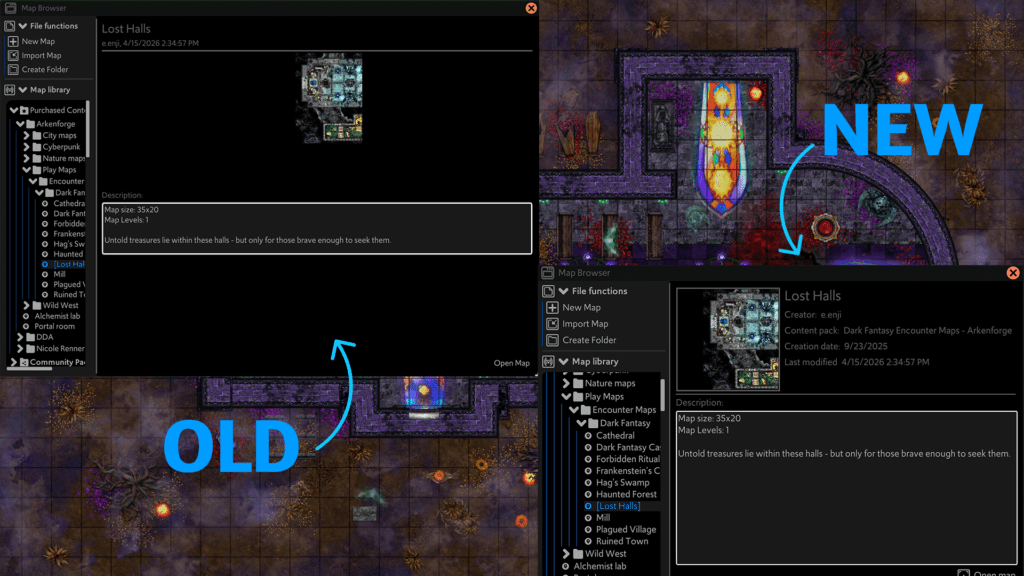
New Map Browser UI
The old Map Browser window left a bit to be desired. There was quite a bit of empty space, leaving quite a bit of room for improvement. This new UI gives much more information, and looks great doing it.
What’s next?
The next update series will be v0.5.2, and will focus on Map Tokens and improvements to the Notes system.
Here is a few examples of features we are hoping to include:
- Different token health ring styles
- Tabbed windows
- Multi-image media fields
- Condition markers
This is another important step on the road to the final v0.5 update – a free app for players.
v0.5.1.13 Patch Notes
General
- Moved Map Background options out of Map Tools -> Grid, and into Map Tools -> Background
- Selecting grouped content is now instant. Highlight squares will still load in over time
- Updated Right Click Menu appearance
- Added ‘close’ button to right click menu
- Improved padding on T3 heading buttons
Hotkeys
- Renamed ‘Soundscape’ category to ‘Audio’
- Fixed situations where triggering the hotkey for a nonexistent file would cause a crash
- Added new hotkeys
- Audio
- Master Volume +1
- Master Volume -1
- Master Volume +10
- Master Volume -10
- Fog of War
- Fog brush shape: Box Drag
- Fog brush shape: Polygon
- Movement
- Move up left one square
- Move up right one square
- Move down left one square
- Move down right one square
- Audio
Content Library
- Added ‘Official Packs’ shortcut to Locations section
Effects
- Added volume slider to Sound Trigger effect
Fog of War
- Added Box Drag option for erasing and brushing fog of war
- Added Polygon option for erasing and brushing fog of war
- Manual fog erase/reveal actions have been added to the undo/redo queue
Grid Scaler
- Cursor will now change to a crosshair when selecting grid points
- Selected grid points will now disappear if closing Grid Scaler panel before confirming new grid size
Import
- Fixed a crash that could occur when importing content with a very small width or height
Map Background
- Hovering options in the map background dropdown will now preview the map background
Map Browser
- Updated map browser UI
Map Builder – Assets
- Hovering an asset will now display a large preview of that asset
Notes
- Added ‘Affect grouped content’ checkbox in Controllable field
- Can now hide the table section of a rollable table field
Playlists
- Currently Playing song now bold and highlights with Selected colour
- Long song titles no longer run over other UI elements
Settings -> Layering
- Added option to reverse layer stack. This will bring it in line with software like Photoshop, where the lowest item is at the bottom
- Added ‘Upper level shadow strength’ slider
Shown Content
- Shown content size now ranges from 0.1 -> 3
Tokens
- Tokens will now be hidden if using dynamic fog with ‘Hide already seen’ disabled if the are in an area not currently visible
Touch
- Added ‘Start/Stop streaming player screen’ button to Touch panel
- If Local Streaming is active, can now stream splayer screen to v4 Touch Client
- Tokens with ‘Affect grouped content’ enabled will now move their grouped content with touch control
- Added option to manually connect to a touch client by IP address
Widgets
- Added a second row to the Fog of War widget. This row contains fog brush options for Manual fog mode